APGEOG4440 M - Geoinformatics Remote Sensing II (Winter 2015-2016)
Road Extraction
As mentioned before, enhancement image of corrected band 3 with the scaling factor of 16 was selected for further road extraction due to its outstanding contrast between road and non-road features. At the first place, a binary layer of roads has to be created. By looking up in Geomatica Online Help, Thresholding Image to Bitmap (THR) is an algorithm which creates bitmaps from image channels, including complex channels, given minimum and maximum threshold values.


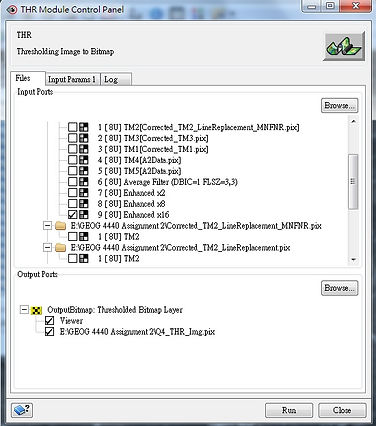

The Algorithm Library was opened and THR was selected under 'All Algorithms'. After that, THR Module Control panel popped up. The enhancement image of corrected band 3 with the scaling factor of 16 was selected assigned as the 'Input: raster Layer(s)'. In the tab of 'Input Params 1', both threshold minimum and maximum were required. Therefore, going back to the interface of Geomatica, the maximum and minimum pixel values of roads were identified by using 'Numeric Values'. And the values were 255 and 91 respectively. Heading back to the THR panel, these 2 values were inputted and the function was executed. The binary layer of roads was then presented in the interface automatically.

After creating a binary layer, the pixels with the value ranging from 91 to 255 which belonged to non-road features were removed. It was done by 'Raster Editing'. The 'Pixel value' and 'Line width' within the panel were set to 3 and 1 pixels respectively. 'Eraser Polygon' was used to remove the unwanted pixels. 'Line' drawing tool was used to ensure the connectivity and continuity of roads. The binary layer after editing was saved as a new layer afterwards. The image is presented as below.


Then, the raster file storing the binary layer of roads was then converted into a vector file. By looking up in Geomatica Online Help, Converts a Bitmap to Lines (BIT2LINE) is a algorithm which creates a line layer from a bitmap segment. It also provides an option to omit lines on the edge of the bitmap and an option to smooth the lines.


The Algorithm Library was opened and BIT2LINE was selected under 'All Algorithms'. After that, BIT2LINE Module Control panel popped up. The raster file storing the binary layer of roads was selected as the 'Input: Bitmap Layer'. In the tab of 'Input Params 1', the box of 'Smooth vectors' was checked while the box of 'Remove lines on edges' was not. After executing the function, the result was presented in the interface automatically. Last but not least, the vector file was converted into shapefile by using 'Translate (Export) File'. The map is presented below.

The following map is the overlay of extracted roads (in shapefile) on the original (uncorrected) true-color image.


Please Click Image to Enlarge!